

Metadata
Metadata is structured additional information about files and documents. It helps to describe content in OPAL unambiguously, make it easier to find, and classify it correctly. Typical metadata include the title, description, author and year of publication for example.
In OPAL, you can assign and edit metadata for files in various places. For example, you can do this when editing files in courses, groups, resource folders or personal folders.
The metadata assignment feature is available both in the course view and – with a customised layout – in the editor view.
Enter or edit metadata
When editing files, metadata can be maintained in the following places, amongst others:
- for files in course or group modules (e.g., folders, assignments, forums, wikis),
- in the course storage folder,
- in the resource folder
- in the personal folder
You can open the file for editing by clicking the pen icon. The metadatand a section will then appear below the file form and is organised into individually expandable and collapsible metadata categories.
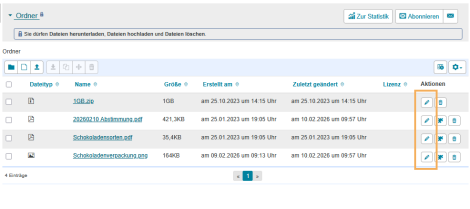

The available metadata categories depend on the file you are editing.
- General metadata: This section is always available. Use it to enter the title, description and author of the content. For PDF documents, you can also use the function to extract data from a PDF document.
- Extended metadata: The maintenance of a comprehensive metadata set depends on the specific learning platform. In OPAL, the system used by Saxon universities, for example, the following metadata fields can be filled: publisher, source, location, month of publication, year of publication, pages, language, URL, work, project, category, chapter, duration, media type, Nav1, Nav2, Nav3, series, and release.
- Technical metadata: This section displays metadata about the file that cannot be edited. This includes the creator, the dates of creation and modification, as well as the file size and file type.
Confirm your metadata changes by clicking the Save button.
Metadaten aus PDF-Dateien extrahieren
Für PDF-Dokumente steht eine zusätzliche Funktion zur Verfügung, mit der einzelne Metadaten automatisch aus der Datei übernommen werden können. Diese Funktion ist nur für PDF-Dateien verfügbar und wird nur registrierten Nutzern angezeigt. Es können folgende allgemeine Metadaten aus der PDF-Datei übernommen werden: Titel, Beschreibung, Autor.
Die Funktion erscheint nur beim Bearbeiten bereits hochgeladener PDFs:
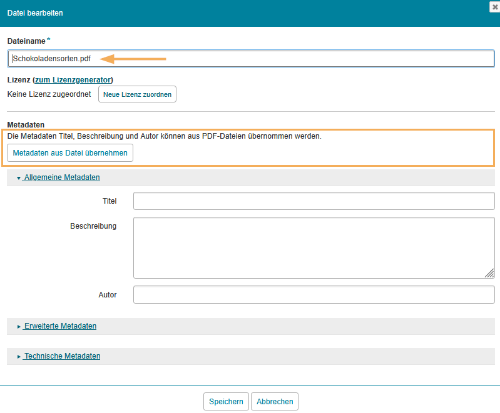
Ein Klick auf den Button Metadaten aus Datei übernehmen extrahiert die Daten aus der Pdf-Datei und füllt sie in die entsprechenden Felder. Sind für eine Datei bereits Metadaten hinterlegt, erscheint vor der Übernahme ein Bestätigungsdialog.
Bestätigen Sie die Änderungen an den Metadaten mit Klick auf den Button Speichern.