Lernressource erstellen
Zuletzt geändert von Carina Enke am 26.11.2025
Um einen neuen Lerninhalt zu erstellen, gehen Sie wie folgt vor:
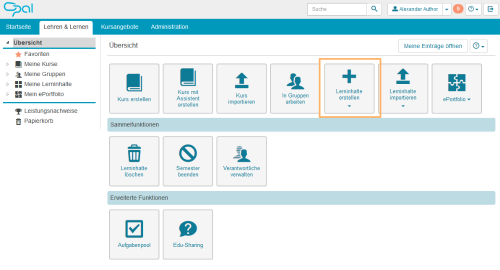
Öffnen Sie den Tab Lehren & Lernen. Klicken Sie auf der Startseite des Bereichs auf den Button Lerninhalte erstellen. |
|
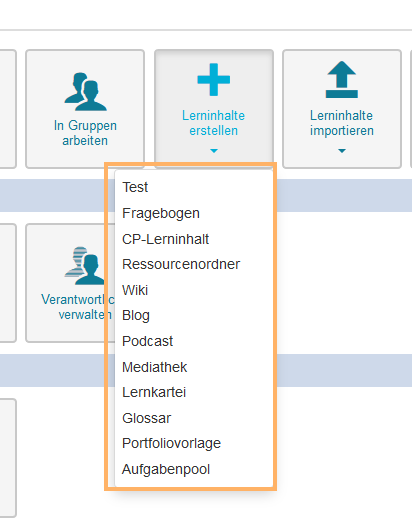
Wählen Sie den gewünschten Lerninhaltstyp aus, den Sie erstellen möchten, z.B. ein Wiki. |
|
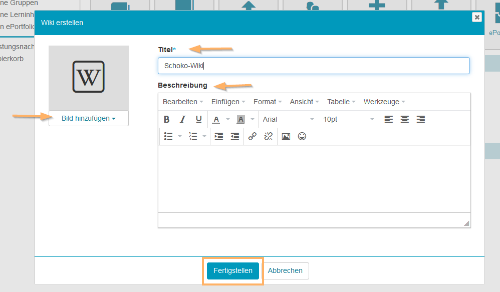
Tragen Sie im Dialog einen Titel und eine Beschreibung für Ihren Lerninhalt ein. Optional können Sie ein Bild zur Ressource ergänzen. Schließen Sie den Dialog mit Klick auf den Button Fertigstellen ab. |
|
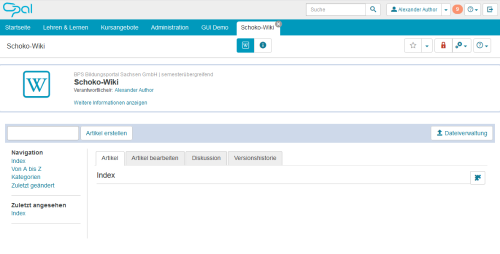
Der erstellte Lerninhalt öffnet sich. Je nach Lerninhaltstyp sind dort verschiedene Funktionen und Informationen verfügbar. Die Ressource kann jetzt bearbeitet oder in einen Kurs eingebunden werden. |
|