

Use Catalogue
The main section shows the available catalogue categories at the top with all the courses and learning resources referenced in the selected category at the bottom.
What you can do in this area:
- Hover the mouse pointer over an entry (without clicking it) to learn more about the content of a category or resource. If the supervisor has provided a description, it will be displayed as a tooltip.
- Click on a category to open it.
- Click on a course/learning resource to start it. The course or learning resource will open in a new tab.
Mark or remove courses or resources as a favourite ...
A filled  favourites icon will indicate courses and learning resources which are already marked as a favourite.
Click on the filled star icon to remove them as favourites, or mark additional courses and learning resources by clicking an empty favourites icon.
Favourites will be displayed in the tab Teach & Learn>Favourites as well as in the favourites portlet on the home page. For more information, see the section Favoriten.
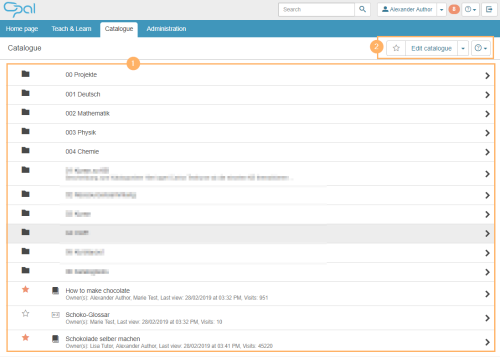
This area shows the additional functions that are available.
| Users with extended rights will be able to see the Edit catalogue button in the top right corner. Using this button, they can edit the structure of the catalogue and add courses and learning resources to created categories. |
| Opens other available functions such as Set “catalogue view” as home page. |

