

Licences for courses, learning ressources and documents
Licenses can be assigned to various types of content (courses, learning resources, documents). The platform primarily offers OER licenses based on Creative Commons (CC). A CC-Lizenz allows for the definition and specification of. Die Lizenz regelt damit die Möglichkeiten zur freien Nutzung, Bearbeitung und Weiterverbreitung im Sinne von Open Educational Resources (OER).
Zusätzliche fachspezifische Lizenzen können auf Nachfrage ebenfalls im System hinterlegt werden.
Neben der Vergabe von Lizenzen erhöhen Metadaten die Sichtbarkeit und Auffindbarkeit von Ressourcen. Welche Metadaten in der Lernplattform verfügbar sind beschreibt die Seite Metadaten.
Available licences
The following licences are currently available:
| Attribution: You are free to: Share - copy and redistribute the material in any medium or format; Adapt - remix, transform, and build upon the material for any purpose, even commercially. | |
| Attribution - ShareAlike: You are free to: Share - copy and redistribute the material in any medium or format; Adapt - remix, transform, and build upon the material for any purpose, even commercially. | |
| Attribution - NonCommercial: You are free to: Share - copy and redistribute the material in any medium or format; Adapt - remix, transform, and build upon the material. | |
| Attribution - NoDerivatives: You are free to: Share - copy and redistribute the material in any medium or format for any purpose, even commercially. | |
| Attribution - NonCommercial - ShareAlike: You are free to: Share - copy and redistribute the material in any medium or format; Adapt - remix, transform, and build upon the material. | |
| Attribution - NonCommercial - NoDerivatives: You are free to: Share - copy and redistribute the material in any medium or format. | |
| Universal: You can copy, modify, distribute and perform the work, even for commercial purposes. Attribution is not mandatory. |


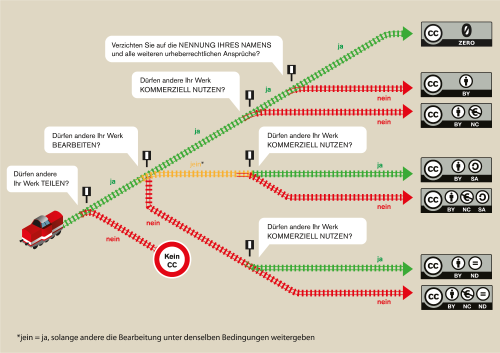
Assistance for the selection of a suitable licence is also provided by the licence generator, which proposes possible licences based on selected criteria, or the graphic "What is the best CC licence for me?" by Barbara Klute and Jöran Muuß-Merholz for wb-web:
Assigning licences
A license can only be assigned if a file is created in the platform, an uploaded file is edited, or settings are configured for a resource or course.
Assigning a licence to a new file
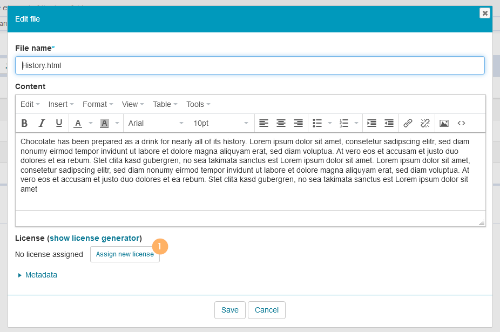
1 | When creating documents, you will find the section on licencing in the lower part of the dialogue. Click on Assign new licence. |
|
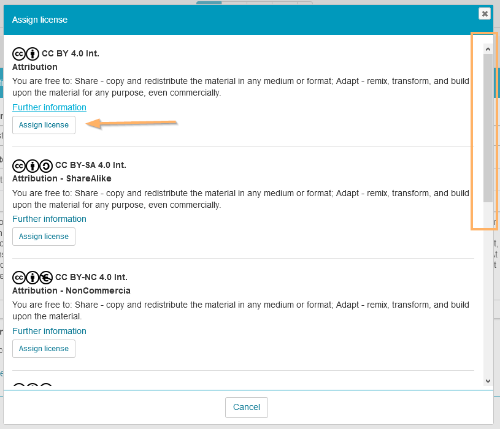
2 | Select the desired licence from the list using the Assign licence button. |
|
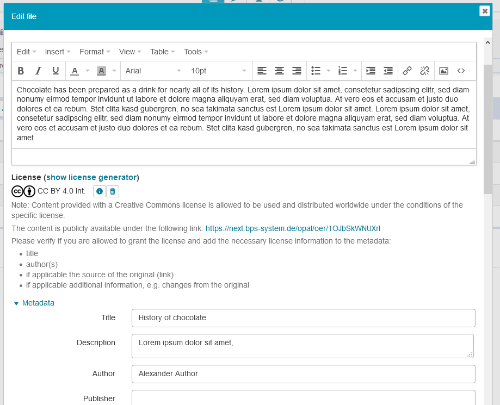
3 | The selected licence will be displayed below the document content. Please carefully check the information and, if necessary, add any information missing in the metadata. |
|
4 | Save your entries. | |
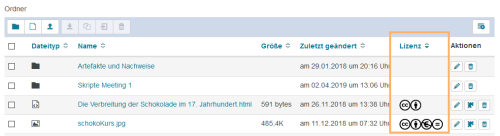
5 | If the column Licence has been configured, licence icons will be displayed in the table. |
|

Assigning a licence to courses and learning resources
Assigning a license to a course or learning content is already possible during the creation of the resource and follows the same process as Lizenzvergabe an einem Dokument. Eine nachträgliche Vergabe oder Änderungen an der getroffenen Zuordnung sind in den Kurseinstellungen über die Funktion Titel und Beschreibung ändern verfügbar.

Displaying the licence
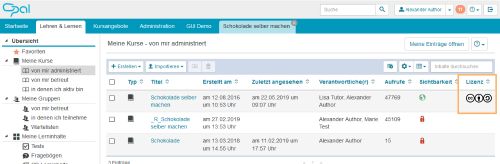
Licencing information can be found in the more course or learning resource information area. Additionally, licences can also be displayed in a separate column in the table view.
Lizenzen werden bei den Informationen zum Kurs oder Lerninhalt angezeigt. Zusätzlich können sie in Tabellenansichten als Spalte eingeblendet werden.
|
|
|

Removing the licence
Assigned licences can be easily removed and replaced with others. To do this, switch to the dialogue in which the licence was assigned. For documents, this view can be opened by using the Edit button. Then click on the trash icon next to the currently used licence. This will remove the assigned licence, and a new assignment can be made.
Searching for resources with a licence
Suchergebnisse der globalen und auch der kursinternen Suche können in den erweiterten Sucheinstellungen auf Inhalte mit einer OER-Lizenz beschränkt werden.

