

Licences for courses, learning ressources and documents
Licenses can be assigned to various types of content (courses, learning resources, documents). The platform primarily offers OER licenses based on Creative Commons (CC). A CC-Licens allows for the definition and specification of possible restrictions regarding further use of content. Thus, the license governs the possibilities for free use, editing, and redistribution in alignment with the principles of Open Educational Resources (OER).
Additional subject-specific licenses can also be stored in the system upon request.
In addition to license assignment, metadata enhances the visibility and discoverability of resources. The page Metadata describes which metadata are available in the learning platform.
Available licences
The following licences are currently available:
| Attribution: You are free to: Share - copy and redistribute the material in any medium or format; Adapt - remix, transform, and build upon the material for any purpose, even commercially. | |
| Attribution - ShareAlike: You are free to: Share - copy and redistribute the material in any medium or format; Adapt - remix, transform, and build upon the material for any purpose, even commercially. | |
| Attribution - NonCommercial: You are free to: Share - copy and redistribute the material in any medium or format; Adapt - remix, transform, and build upon the material. | |
| Attribution - NoDerivatives: You are free to: Share - copy and redistribute the material in any medium or format for any purpose, even commercially. | |
| Attribution - NonCommercial - ShareAlike: You are free to: Share - copy and redistribute the material in any medium or format; Adapt - remix, transform, and build upon the material. | |
| Attribution - NonCommercial - NoDerivatives: You are free to: Share - copy and redistribute the material in any medium or format. | |
| Universal: You can copy, modify, distribute and perform the work, even for commercial purposes. Attribution is not mandatory. |


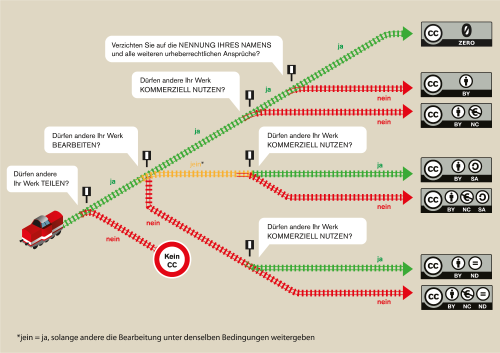
Assistance for the selection of a suitable licence is also provided by the licence generator, which proposes possible licences based on selected criteria, or the graphic "What is the best CC licence for me?" by Barbara Klute and Jöran Muuß-Merholz for wb-web:
Assigning licences
A license can only be assigned if a file is created in the platform, an uploaded file is edited, or settings are configured for a resource or course.
Assigning a licence to a new file
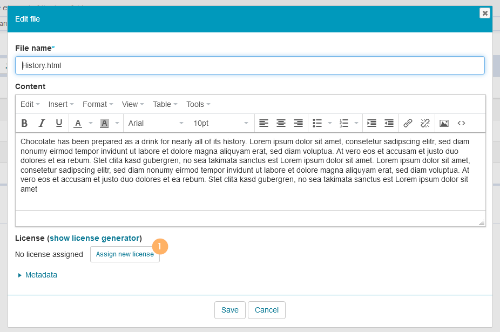
1 | When creating documents, you will find the section on licencing in the lower part of the dialogue. Click on Assign new licence. |
|
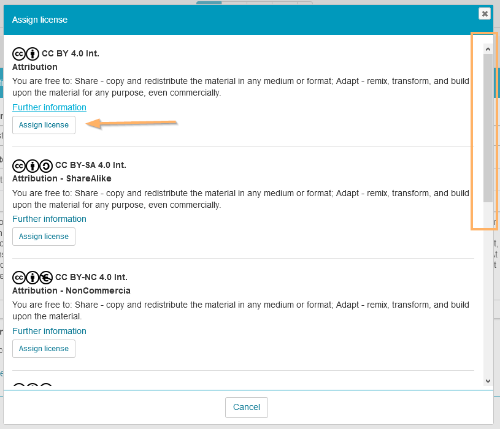
2 | Select the desired licence from the list using the Assign licence button. |
|
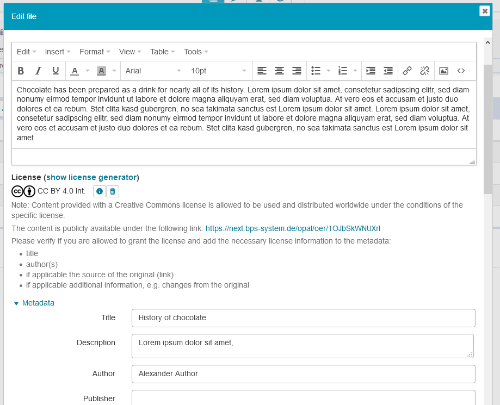
3 | The selected licence will be displayed below the document content. Please carefully check the information and, if necessary, add any information missing in the metadata. |
|
4 | Save your entries. | |
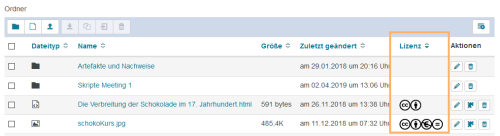
5 | If the column Licence has been configured, licence icons will be displayed in the table. |
|

Assigning a licence to courses and learning resources
A licence can be assigned to a course or learning content when the resource is created, in the same way as licensing of a new file. A subsequent assignment or changes to the existing assignment can be made in the course settings by using the Edit title and description function.

Displaying the licence
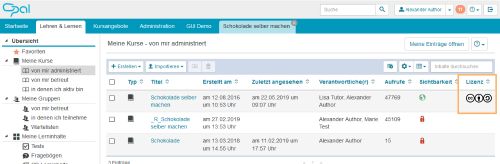
Licences are displayed in the information section for the course or learning content. They can also be shown as a column in table views.
|
|
|

Removing the licence
Assigned licences can be easily removed and replaced with others. To do this, switch to the dialogue in which the licence was assigned. For documents, this view can be opened by using the Edit button. Then click on the trash icon next to the currently used licence. This will remove the assigned licence, and a new assignment can be made.
Searching for resources with a licence
Search results from both the global and the course-internal search can be restricted to content with an OER licence in the advanced search settings.

