Resources can be deleted from within the opened resource view as well as the resource list. To delete a resource directly from within the opened resource view, proceed as follows:
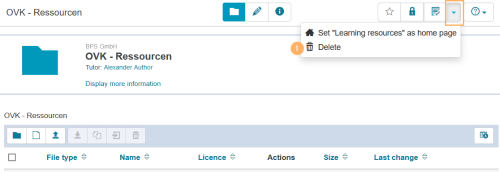
Open the resource and click on the expand icon in the upper right corner. Select the entry Delete. | |
Confirm the dialogue with OK to delete the resource. |
To delete a resource from within the list view, proceed as follows:
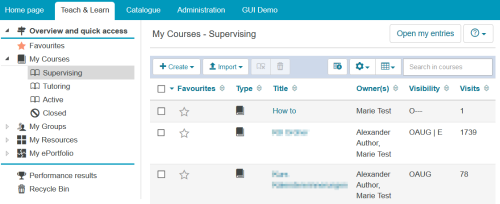
Go to the tab Teach & Learn and open the entry that lists the resource you want to delete. For example, open the entry My Courses - Supervising if you want to delete a course that you are supervising. | |
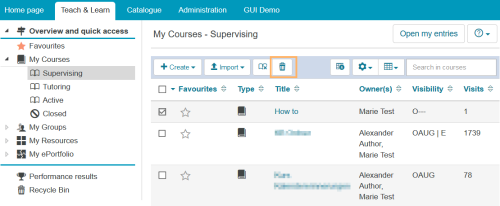
Select the resource you want to delete by clicking the checkbox in front of it. As soon as at least one table entry is marked, the delete function in the table header will be activated. Run the delete function by clicking the trash can icon. | |
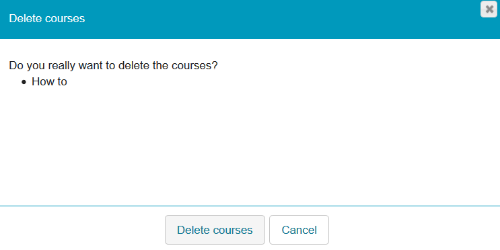
Confirm the dialogue with Delete courses or Delete learning resources. | |
InformationA deleted resource is not immediately removed from the system but will still be available in the recycle bin for approx. another 90 days. During this time, it is possible to restore deleted content and therefore, undo the deletion. Only after the defined time period has expired, the resources will be completely and permanently removed from the learning platform.
The availability of the recycle bin and the time period until your resources are completely deleted depend on the configuration of the learning platform. If the recycle bin is configured, you will find it in the area Teach & Learn as soon as a resource has been deleted.
WarningCaution
If you delete a course, it will be removed from the system. All course content, user and transactional data, as well as assessments will be lost. This action can only be reversed while the course is in your recycle bin. If no recycle bin has been configured for your system or the time period of about 90 days has expired, this action cannot be undone.
Alternatively, you can also close courses that are no longer needed. For more information, refer to the help page Close course.