Changing the course language
Last modified by Anna Paul-Hasenfuss on 19.01.2026
Courses may be offered in other languages. The course language displayed depends on your individual user or browser settings.
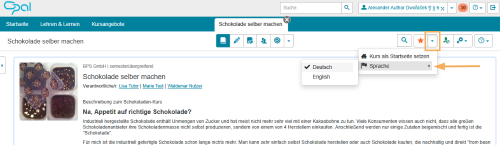
For courses that are already available in multiple languages, you can change the language directly in the course settings:
- Go to the general functions area in the top right corner and click on the small triangle icon next to the star icon.
- A drop-down menu will open, in which the Language entry is available.
- Activate your preferred course language here by clicking on it.