

06 Integrate formulas
ONYX offers authors the possibility to integrate formulas in MathML or LaTeX notation. ONYX uses the established MathJax framework for optimal presentation of your formulas in all browser views.
For an easy creation and automatic conversion of your formulas into the LaTeX markup language, several LaTeX formula editors can be downloaded from the internet. For example, MyScript Math or the Latex formula editors by Matheretter and Zahlenkern offer extensive functionality and simple operation at the same time.
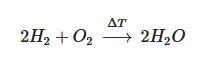
Creating formulas
Formelerstellung mit dem integrierten Formel-Plugin
Um Formeln in eine Aufgabe oder einen Test zu integrieren, steht im ONYX Editor ein Formel-Plugin zur Verfügung. Sie finden diese Funktion im HTML-Editor, beispielsweise im Textfeld zur Eingabe der Aufgabenstellung. Hier können Formeln in einen Dialog mit Hilfe eines Formeleditors oder per LaTeX Notation erstellt werden.
Um eine Formel in einem Textfeld zu erstellen, gehen Sie wie folgt vor:
Select the formula option | 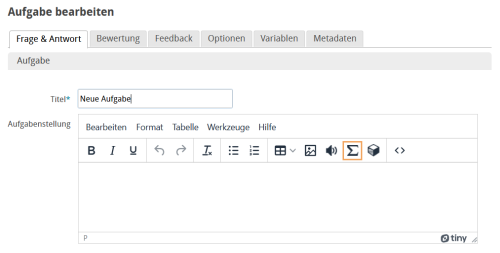 |
In the dialogue, enter your formula in the text field in MathML or LaTeX notation. Below the input field, you will be given a preview of the formula. Click on Finish to insert the formula into the test content. | 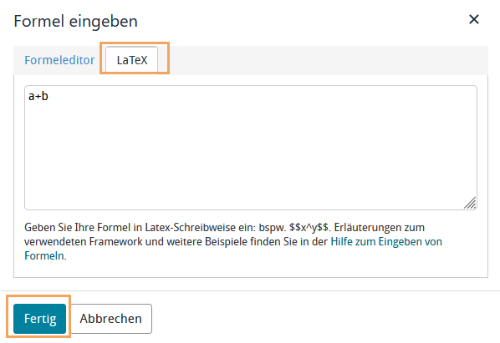 |
The formula is then displayed in LaTeX notation in the text field. If necessary, you can change this default configuration in your ONYX user settings and display a placeholder image instead. | 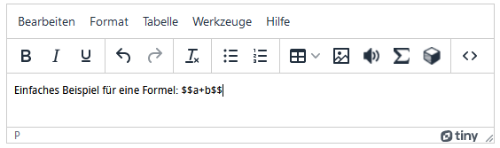 |
| In the question preview and later in the user view, the formula is displayed the same way as in the formula preview. | 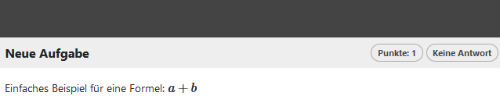 |
 in the text editor.
Creating formulas with LaTeX
The ONYX Editor provides LaTeX support for all author inputs. Via the HTML editor, which is part of the ONYX Editor, you can integrate formulas into all question areas such as the question text, alternative answer options, or feedback, using the LaTeX markup language. The formula display is done with the established MathJax Framework, and your formula is automatically converted to a professionally formatted formula.
Fig.: LaTeX input in the ONYX Editor |
Fig.: Formula display in a test situation |
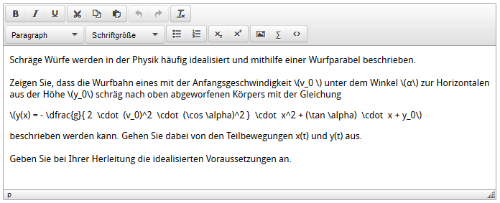
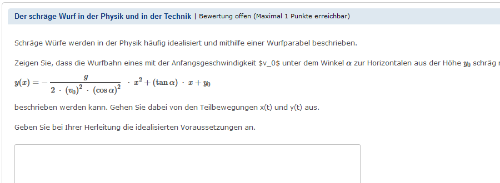
In order to display mathematical formulas in LaTeX, you just need to integrate the formula into your text. This can be done as follows:
- \( Formula \)
- \[ Formula \]
- $$ Formula $$
You can find extensive material on how to generate formulas with LaTeX on the internet. For example, detailed examples are provided in the Wikibook: LaTeX compendium for mathematicians (in German).
Formeldarstellung im ONYX-Player
ONYX verwendet das Framework MathJax zur Formeldarstellung in der Testausführung. Auf den Demo-Seiten von MathJax finden Sie verschiedene Beispiele zur Formeleingabe.
Weitere externe FormeleditorenBearbeiten
You can find numerous LaTeX formula editors on the internet to assist you in creating LaTeX formulas. For example, the MyScript website offers simple operation. Just write the desired formula in the free area using your mouse or stylus. The formula editor then translates the displayed formula into LaTeX notation and, if appropriate to the formula, also shows a graph of the created function.
MyScript
Eine einfache Bedienung bietet die Webseite MyScript. Schreiben Sie die gewünschte Formel mittels Maus oder Eingabestift in die Freifläche. Der Formeleditor übersetzt die dargestellte Formel in LaTeX-Schreibweise und zeigt, wenn zur Formel passend, auch einen Graph der erstellten Funktion an.
The LaTeX notation for the entered formula is displayed in the top right page area. You can mark it, copy it and then paste it into the ONYX HTML input fields.
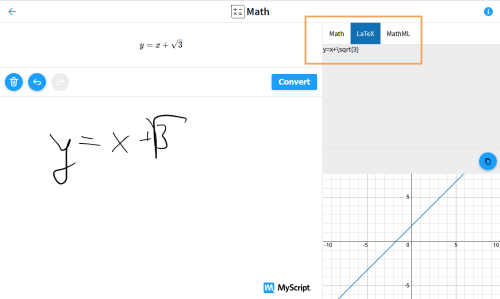
Fig.: Formula input with MyScript
Matheretter and Zahlenkern
With the editor of the Matheretter LaTeX assistant or the Zahlenkern LaTeX formula editor, you can create formulas using ready-made, graphic formula symbols and adapt them. The formula editors also translate the displayed formula into LaTeX notation, which can then be inserted into the ONYX HTML input fields.
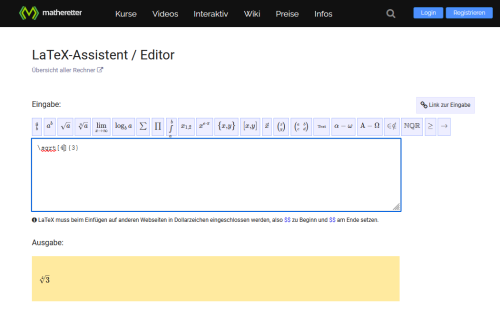
Fig.: Formula input in the Matheretter LaTeX assistant
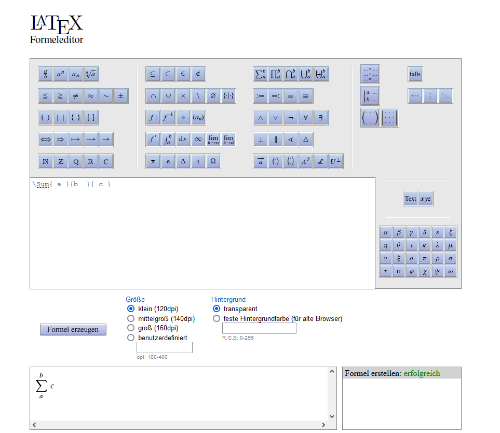
Fig.: Formula input in the Zahlenkern LaTeX formula editor