

Export course
 Export your course to archive it locally on your PC, on a disc, or on some other external memory device. You can carry out the export at any time. Depending on the intended use of the course export or archive, there are four export formats available. After you have selected an export format, the course will be provided for download as a ZIP file. All courses exported from OPAL can be reimported into OPAL at any time.
Courses can be easily and quickly exported.
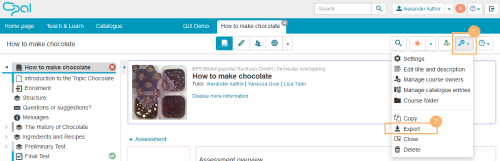
1 | Start the function from within the more settings menu in the course view. |
|
2 | Select the entry Export. | |
3 | A dialogue opens in which various export formats are provided. |
|
4 | Click on the link of an export format to create a .zip file of the selected content. |
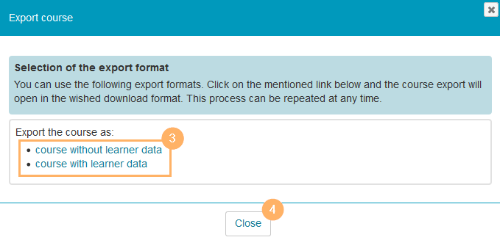
Available export formats
The following course export options are available: