

Variables
By using expert rules, user attributes and assessment data from a course can be obtained. Such a value can be bound to a variable in the test at test start, making it usable during the test procedure.

For example, the following usage scenarios are possible:
- Customization of test questions or feedback content by directly addressing the learner
- Display of customized test content based on a learner's selected field of study or grade
- Display of test content based on previous test results in the course
- Controlling random values in the test
Both the expert rules and the variable to be transferred can be configured in the course element Test in the tab Variables. Here you can view the available test variables of the course element and define the expert rule required for the transfer.

Consult available test variables
In the section Test variable you can see the system and user variables available in this test and their data type. This information is displayed as soon as you have included a test resource in the course element test. Now click on Output variables of the assigned test in the Variables tab of the Test Variable section to open the list. After that all system and user variables available in the test are displayed in a list. The following example shows a test resource with a user variable "name" and three system variables for points in the test (MAXSCORE, MINSCORE, SCORE).
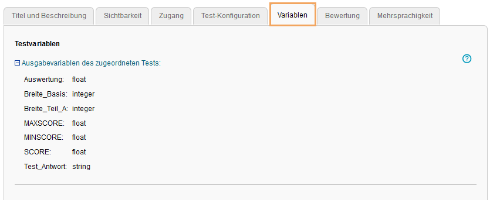
How to create and use user variables in the ONYX-test is described on the page Using test variables of the ONYX handbook.
Transfer variable values to a test
Specify the value you want to transfer to a selected test variable in the Transfer values to test section. To do this, first select the preferred test variable from the list offered in the Test variable field. Now determine in the field Expert rule how the value to be transferred can be determined. Ensure that the data type of the selected variable matches the data type of the value to be determined for the expert rule. Please also note that the expert rule used can only transfer one value. It shall not contain a comparison.

Examples of possible expert rules
The following example views show highly simplified examples for illustrative purposes. All of these are also available in a tutorial and can be tried out. You can find the tutorial via link https://bildungsportal.sachsen.de/opal/auth/RepositoryEntry/37986009089/CourseNode/1670470101585115009.
Further information on creating expert rules can be found on the page Expert mode, a list of the usable syntax for expert rules can be found on Expert syntax.
Scenario | Expert rule | Example view in the test procedure after the transfer of the determined value |
|---|---|---|
Transfer of the test outcome from another course element test of the course, here with course element ID 1670470101589006009. Please note that points can only be transferred with two decimal places by OPAL. | getOnyxTestOutcome("1670470101589006009","SCORE") |
|
Transfer of user attributes, here on the example of the first and last name of the participant.
| 'getUserProperty("firstName") + " " + getUserProperty("lastName")' |
|
Transfer of the number of already performed test attempts of another course element test in the same course, here with course element ID 1670470101589006009. | getAttempts("1670470101589006009") |
|
Transfer of the progress value of another course element, here the progress to the course element with the course element ID 1670470101585115009. For information on how to configure and use the course progress, see the page Kursfortschritt. | getProgress("1670470101585115009") |
|


