

Configuration of the Size and Spacing of Assignment Elements (CSS)
ONYX allows you to customise the design of assignment elements with CSS. By using CSS, users can individually alter the assignment element attributes, such as size and spacing, in match interactions.
The procedure for changing the size and the spacing of assignment elements is explained by the example of an assignment task on the subject of Johann Wolfgang von Goethe. The assignment element contains text quotations from the works of the poet. The default display of the assignment task restricts the assignment element to 300 pixels (px) width and provides only a small distance to the edge in order to optimise the space requirement and to optimally integrate picture media. For long text passages, however, a wider display of the boxes and an increased distance to the edge may be desired.
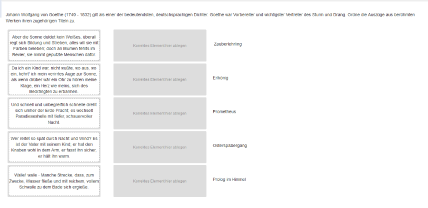
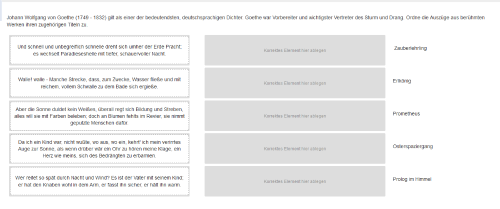
1. STEP: Create a new match interaction
The configuration is possible for the assignment element of a simple match interaction. To create the task, proceed as usual. Detailed instructions can be found in the help section Match interaction.
2. STEP: Configure assignment elements (CSS)
The individual configuration for the size and distance of the content to the edge of the assignment elements is done in a separate CSS file, which you can upload to any task.
You can use the following CSS statements as a template:
.interaction-match .dragCont div {padding: 10px;}
The setting min-width defines the size of the assignment elements. The default setting, if no CSS configuration is present, is 300 px.
The setting padding defines the distance of the content to the edge of the assignment elements. The default setting, if no CSS configuration is present, is 0 px.
3. STEP: Add the CSS file to the task
Save your CSS statement in a CSS file *.css. The CSS file can be uploaded to the tab Options under Layout setting. Detailed instructions can be found in the help section Create task > Layout settings.