

01 OPAL - Overview
Why OPAL? This is certainly one of your key questions at the beginning. We have collected this and other important questions for you and answered them here so that you can get started quickly.
- Why OPAL? Which learning scenarios are possible?
- How do I or learners get into the system?
- Where can I find contacts for technical questions?
- I would like to provide content, communicate from any location or collect processed documents from learners. How can I do that?
- How do learners find the documents I provide?
- Wie kann ich meine Kurse technisch optimieren um lange Ladezeiten zu vermeiden? Gibt es Empfehlungen dazu?
- Wo finde ich interessante Lerninhalte oder Kurse?
- Wo gibt es einen Austausch von Erfahrungen zwischen den Lehrkräften?
Why OPAL? Which learning scenarios are possible?
Thanks to the learning platform, you can organize all learners in a course as a group, just like in a classroom. Within this (course) room, you can provide documents in digital form (files) and communicate with learners in several different forms (written, verbal, visual) simultaneously, synchronously or asynchronously.
How do I or learners get into the system?
| Register, user account and contact | Login pages |
|---|---|
Saxon Universities and Vocational Academies: All users of Saxon universities have a user account provided by their responsible institution. Find the relevant contact details on Contact or the website of your university. | Central login page: https://bildungsportal.sachsen.de/opal |
Schools in Saxony Public schools: Every public school - whether for general education or vocational training - can use SaxSVS to automatically and easily create accounts for Schullogin.de for their students and teachers. An access data report can be printed out and handed over. The following pages provide support on how to create several accounts in one go:
With these accounts, you can use OPAL Schule immediately and free of charge. After you have logged in to Schullogin.de, you can start it by clicking on the icon. Independent schools: Each school that is registered in the Official Saxon School Database and thus also has an official school identification key (Dienststellenschlüssel), can use OPAL Schule free of charge. Please contact the school login colleagues at support@schullogin.de. They will gladly set up the necessary accounts in consultation with you. | Direct link school login: https://www.schullogin.de Direct link OPAL Schule: https://www.opal-schule.de Direct link general information: OPAL Schule |
Services for other institutions: Let us know what you need and we will find a solution. Simply send a message to vertrieb@bps-system.de. |
|
For general questions and information on how to log in, visit Registration and Login
Where can I find contacts for technical questions?
Please get in touch with the relevant office at your institution, university or school first. Is your local office overloaded or are you unsure who is responsible for you? We will be happy to help you. Please send an email to our support team: (support@bps-system.de). Don't forget to state your name and the organization you work for.
I would like to provide content, communicate from any location or collect processed documents from learners. How can I do that?
For all three requirements, the learning platform offers a wide range of options. In addition to all available information on our help pages for authors and available wizards for the creation of E-learning scenarios, for a quick implementation within the current situation we offer step-by-step instructions for the following central scenarios:
I would like to provide content
The easiest way to do this is with a course element of the type Folder. This page describes how you proceed: How to provide course content
Even if not all learners are registered on the learning platform, you can still provide (protected) material: How to provide course content for non-registered users
I would like to communicate from any location
Learn how to integrate a Virtual Classroom course element into your course: How to communicate in the virtual classroom
Saxon universities and vocational academies:
The Virtual Classroom course element is made available to Saxon universities and vocational academies via the Adobe Connect service provided by DFN. Because of the exceptionally high usage, there may be longer loading times on the DFN side over which OPAL has no influence.
Please note the latest Information from the DFN.
I would like to collect processed documents from learners
The simplest option would be to use another Folder course element. You should, however, request meaningful file names from the learners so that you can subsequently assign the content of the submitted files to the users. A much more convenient option here is the Task course element. How to integrate it into a course can be found here: How to collect documents with the Task course element.
I require all these options
To spare you configuration steps, we have prepared a course for all three scenarios, which you can use to get started in just a few clicks. The download and instructions for importing can be found here: How to use the Import template
How do learners find the documents I provide?
The fastest way to do this is by providing a direct link to the course if you know the learners concerned.
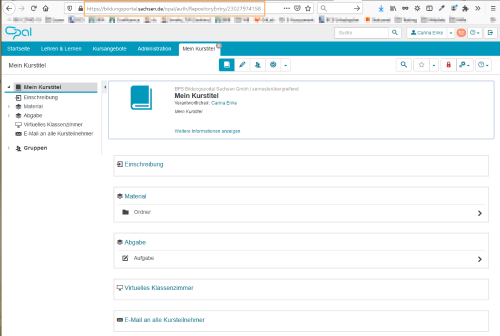
Wo finde ich den Direktlink zum Kurs? ...
Kopieren Sie die angezeigte URL aus der Adresszeile Ihres Browsers und teilen Sie diesen Link den Lernenden mit. Alternativ reicht es auch, den genauen Titel des Kurses oder die ID des Kurses (= mehrstellige Zahl in der URL, im Beispiel 23027974158) mitzuteilen. Mit diesen Informationen wird der Kurs innerhalb der Lernplattform mit der Suchfunktion ebenfalls gefunden.
|
|
Some learners are not yet registered and have a user account:
- How you still can provide material is described on this page: How to provide content for non-registered users
How tutors can enrol learners:
- This page describes one way of organizing learners in a course into a group or class: NHow to inform users via Direct link
How learners can enrol themselves:
- Im Hochschulbereich ist es üblich, dass Lernende sich selbst in die individuell benötigten Kurse einschreiben. Wie Sie eine entsprechende Möglichkeit in Ihrem Kurs mit einem Baustein Einschreibung umsetzen, beschreibt die Seite: Selbsteinschreibung in den Kurs vorbereiten
- Die Lernenden müssen selbst die für sie zutreffenden Kurse finden und sich einschreiben. Hier ist es notwendig, dass Sie Ihren Kurs an eine zentrale Stelle im Katalog eintragen oder die Lernenden auf anderen Wegen informieren, dass entsprechende Inhalte bereit stehen. Wie Sie ihren Kurs in den Katalog eintragen, erklären wir auf der Seite Kurs in Katalog einfügen.
Wie kann ich meine Kurse technisch optimieren um lange Ladezeiten zu vermeiden? Gibt es Empfehlungen dazu?
Empfehlungen finden Sie im Leitfaden Erfolgreiche Einschreibeszenarien.
Wo finde ich interessante Lerninhalte oder Kurse?
Suchen Sie zunächst im Katalog Kursangebote. Einige Hochschulen oder Schulen haben Kurse öffentlich verfügbar gemacht.
Wo gibt es einen Austausch von Erfahrungen zwischen den Lehrkräften?
- OPAL für Hochschulen:
- OPAL Schule: